


كيف احصل على اشتراك قيم باس رخيص؟ (بدون ما تندم لاحقًا)
كل لاعب على xb أو PC يعرف شعور “أبغى ألعب أكثر… بس الميزانية محدودة”. وهنا يجي السؤال الشهير: كيف احصل على اشتراك قيم باس رخيص؟
الجواب ليس “أرخص سعر وخلاص”، لأن الاشتراك الرقمي يحتاج توازن بين السعر + الموثوقية + طريقة التفعيل. في هذا الدليل بنعطيك طرق عملية للتوفير، وكيف تختار اشتراك xbox game pass المناسب لك، ومتى يكون اشتراك game pass ultimate منطقي، وكيف تتجنب أخطاء شائعة تخليك تدفع مرتين.

Source: Wikimedia Commons (upload.wikimedia.org)
أولًا: فهم سريع لأنواع “قيم باس” (عشان تعرف وين توفر)
قبل ما تبحث عن “الرخيص”، لازم تعرف: أنت تدفع مقابل خطة.
عمليًا، الناس تخلط بين:
- اشتراك قيم باس (Game Pass) كمكتبة ألعاب
- اشتراك game pass ultimate كخيار يجمع مزايا أكثر (بحسب التوفر في منطقتك)
- خطط موجهة للـPC أو للكونسول (حسب ما تختاره)
مهم: المزايا والتوفر قد يختلف حسب البلد، وقد تتغير بمرور الوقت. ركّز على وصف الخطة في صفحة المنتج وقت الشراء.

Source: Wikimedia Commons (upload.wikimedia.org)
ثانيًا: 7 طرق ذكية للحصول على اشتراك قيم باس “رخيص” بأمان
1) اختر المدة التي تعطي أفضل قيمة (بدل شهر بشهر)
غالبًا—في الاشتراكات الرقمية عمومًا—المدة الأطول تعطي “قيمة أفضل” من الدفع الشهري المتكرر.
إذا أنت لاعب مستمر (تلعب أسبوعيًا على الأقل)، فكّر في:
- 3 أشهر بدل شهر
- أو 6/12 شهر إذا كان استخدامك ثابت
الفكرة: تقلل “تكلفة الشهر” بدل ما تبحث عن خصم خطير من مصدر غير موثوق.
2) لا تشتري Ultimate إذا ما تحتاج مزاياه فعلًا
كثير يسأل عن اشتراك game pass ultimate لأنه الأشهر، لكن الرخص الحقيقي أحيانًا يكون في اختيار خطة أقل إذا كانت تناسب استخدامك.
اسأل نفسك:
- ألعب على PC فقط؟
- ألعب على كونسول فقط؟
- هل فعلاً أحتاج كل مزايا الخطة الأعلى؟
إذا كانت إجابتك “لا”، فخطة أبسط قد تكون أرخص وتؤدي الغرض.
3) راقب عروض المتاجر الموثوقة (بدل “صفقات مجهولة”)
“الرخيص” الحقيقي يجي من عروض موسمية أو باقات واضحة، وليس من روابط غامضة.
قاعدة سهلة: كلما كانت التفاصيل أوضح، كان الشراء أأمن.
4) انتبه لموضوع المنطقة/الحساب (لأنها قد ترفع التكلفة عليك)
بعض الاشتراكات قد تتأثر بالمنطقة أو بلد الحساب. إذا اشتريت اشتراكًا غير مناسب لمنطقتك، قد تضطر لإعادة الشراء أو تدخل في تعقيدات.
قبل الدفع تحقق من:
- هل المنتج مناسب لمنطقتك؟
- هل طريقة التفعيل واضحة؟
- هل عندك الحساب الصحيح جاهز؟
5) فعّل الاشتراك فورًا بعد الشراء (لتتأكد أن كل شيء تمام)
التأجيل يسبب أخطاء: تفعيل على حساب غلط، أو نسيان بيانات، أو ضياع تفاصيل الطلب.
أفضل ممارسة: خصص 5 دقائق بعد الشراء للتفعيل والتأكد من ظهور الاشتراك.
6) حافظ على أمان حسابك (التوفير لا يعني المخاطرة)
إذا كان هدفك “اشتراك xbox game pass رخيص”، لا تضحي بالأمان:
- كلمة مرور قوية
- تفعيل التحقق الثنائي إن أمكن
- لا تشارك بيانات دخولك إلا إذا كانت طريقة التفعيل تتطلب ذلك بشكل واضح ومفهوم ومن مصدر موثوق
7) اشترِ من صفحة منتج واضحة بمعلومات تسليم/تفعيل
أفضل طريقة لتوفير وقتك وأعصابك هي التعامل مع صفحة واضحة فيها: المدة، الوصف، طريقة التفعيل، وما الذي تستلمه.
يمكنك البدء من هنا:
اشتراك Xbox Game Pass عبر NU8TH
[Internal Link: مقارنة خطط Game Pass: أيها يناسبك؟]
[Internal Link: أفضل ألعاب قيم باس على Xbox هذا الشهر]
[Internal Link: طريقة تفعيل اشتراك Xbox خطوة بخطوة]
[Internal Link: نصائح حماية حسابات Xbox وMicrosoft]
[External Reference: official Xbox Game Pass page]

Source: Xbox (cms-assets.xboxservices.com)
ثالثًا: كيف أقرر بسرعة؟ (اختبار 30 ثانية)
اختر إجابة واحدة:
- أنا ألعب كثير وأبغى أكبر مرونة ومزايا ممكنة → غالبًا تفكر في اشتراك game pass ultimate (حسب التوفر والمزايا الحالية).
- أنا ألعب على جهاز واحد فقط ولا أحتاج كل الإضافات → خطة مناسبة للجهاز غالبًا أرخص.
- أنا ألعب قليل أو موسميًا → مدة أقصر قد تكون أذكى بدل التزام طويل.
رابعًا: أخطاء شائعة تخلي “الرخيص” يصير أغلى
- شراء اشتراك غير مناسب للمنطقة/الحساب
- تجاهل طريقة التفعيل ثم الوقوع في لخبطة
- مطاردة أقل سعر من مصادر غير موثوقة
- تفعيل على حساب خاطئ ثم تضطر تشتري مرة ثانية
- نسيان حفظ رقم الطلب/تفاصيل الشراء
الفكرة: التوفير الحقيقي = شراء صحيح من أول مرة.
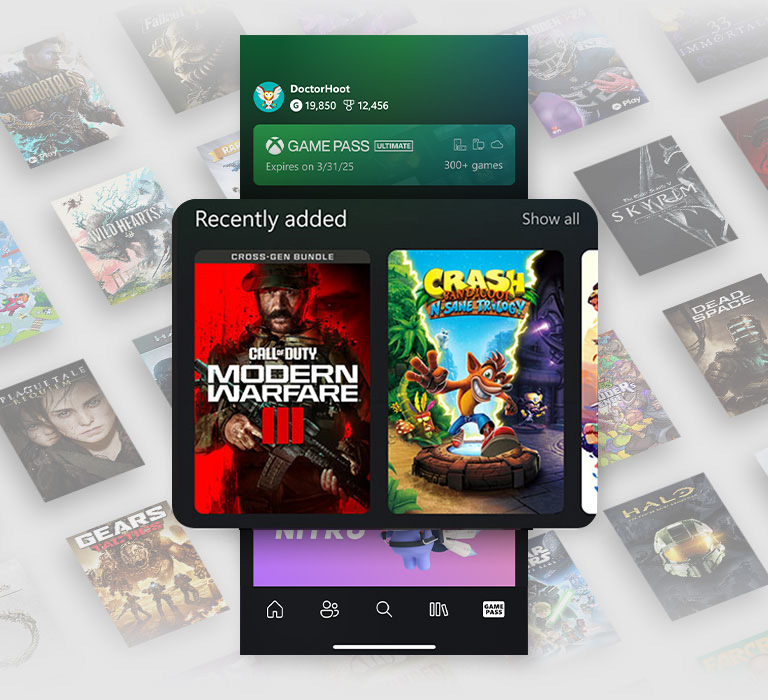
Source: Xbox (assets.xboxservices.com)
خامسًا: خطوات شراء سريعة عبر NU8TH (نموذج عام)
من صفحة المنتج:
اشتراك Xbox Game Pass عبر NU8TH
عادةً تمر العملية بـ:
- اختيار مدة/خيار الاشتراك
- إتمام الدفع
- استلام تعليمات التفعيل بحسب ما هو موضح في الصفحة
- تنفيذ التفعيل وأنت داخل الحساب الصحيح
- التأكد من ظهور الاشتراك في حسابك
التزم بالتعليمات داخل صفحة المنتج لأنها المرجع الأدق لطريقة التفعيل.

Source: Xbox (assets.xboxservices.com)
أسئلة شائعة (FAQ)
1) هل فيه طريقة مضمونة للحصول على “قيم باس رخيص”؟
أضمن طريقة هي اختيار مدة مناسبة + شراء من مصدر موثوق + التأكد من ملاءمة المنطقة والخطة. “الرخيص جدًا” من مصادر مجهولة قد يسبب خسارة أكبر.
2) هل Ultimate دائمًا أفضل؟
ليس دائمًا. اشتراك game pass ultimate ممتاز لمن يحتاج مزاياه، لكن إذا استخدامك بسيط أو على جهاز واحد، خطة أقل قد تكون أوفر.
3) كيف أتأكد أن اشتراك قيم باس مناسب لحسابي؟
اقرأ وصف المنتج: المنصة، المنطقة (إن ذُكرت)، وطريقة التفعيل. وإذا كان لديك أكثر من حساب، تأكد أنك ستفعّل على الحساب الصحيح.
4) هل يمكن أن تتغير مكتبة الألعاب؟
نعم، غالبًا مكتبة الاشتراك تتغير مع الوقت. هذا طبيعي في خدمات الاشتراك.
5) ما أهم شيء بعد الشراء؟
التفعيل فورًا والتأكد من ظهور الاشتراك، ثم حفظ رقم الطلب/رسالة التأكيد.
6) هل ينفع للاعبين الجدد؟
نعم جدًا، لأن اشتراك xbox game pass يسمح لك بتجربة ألعاب كثيرة وتكتشف ذوقك بدون شراء كل لعبة.
الخلاصة: التوفير الذكي = خطة مناسبة + شراء موثوق
إذا هدفك اشتراك قيم باس رخيص، ركّز على:
- اختيار خطة تناسب جهازك
- مدة تعطي قيمة أفضل
- مصدر موثوق وتعليمات واضحة
ابدأ الآن من NU8TH:
اشتراك Xbox Game Pass عبر NU8TH